Adding new pages to Frontend
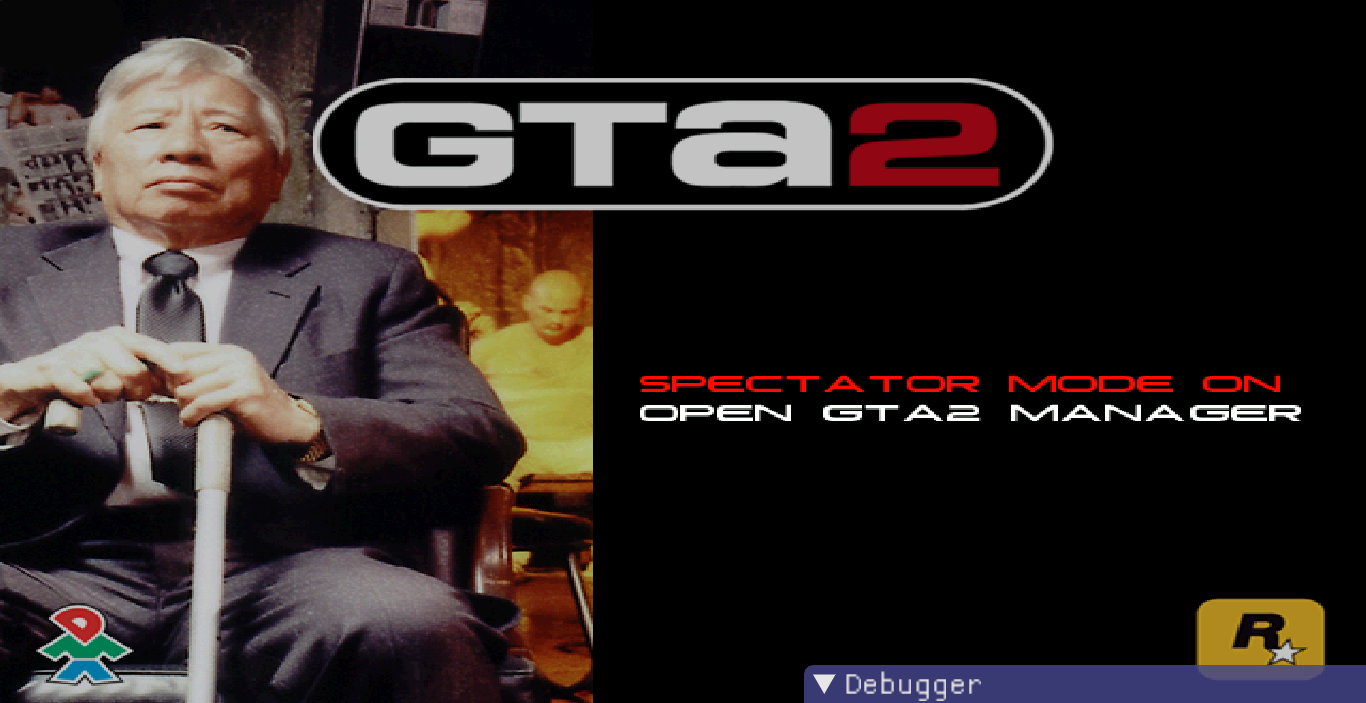
In this example we will create a new page for the Frontend: an options menu page. Instead of just opening GTA2 manager, we will create a menu with two options: one sets (or clear) a global boolean flag gSpectator, while the other opens the GTA2 manager.
We can summarize the addition of pages on the following list:
- Increase the limit of pages (if needed)
- Add an enum for the new page
- Set your page: number of elements, options, their position on the screen etc
- Set the background scene for the new page
- Set what your keyboards keys should do in that page (ESC, left/right arrows etc)
- Configure the horizontal selection of an item (if there is one)
Increasing the limit of pages
First you probably need to increase the limit of Frontend pages. The original has a limit of 17 pages, and most of them are already used. Originally in Frontend.hpp we have
struct Frontend
{
    // ...
    MenuPage field_136_menu_pages_array[17];
    // ...
}
struct Frontend
{
    // ...
    MenuPage field_136_menu_pages_array[30];
    // ...
}
Adding an enum for the new page
Since we will refer to the new page index many times it's important to set an enum for it. We will call it MENUPAGE_OPTIONS_16 and add in MenuPages enum in Frontend.hpp:
enum MenuPages
{
    // ...
    MENUPAGE_OPTIONS_16 = 16,   // new page
}
Setting our page
Frontend::SetupMenuStringsOptionsElements()
{
    // ...
    wcsncpy(pPage->field_4_options_array[1].field_6_option_name_str,
            gText_0x14_704DFC->Find_5B5F90("options"),
            0x32u);
    pPage->field_4_options_array[1].field_80_menu_page_target = MENUPAGE_GTA2MANAGER;
    // ...
}
Frontend::SetupMenuStringsOptionsElements()
{
    // ...
    wcsncpy(pPage->field_4_options_array[1].field_6_option_name_str,
            gText_0x14_704DFC->Find_5B5F90("options"),
            0x32u);
    pPage->field_4_options_array[1].field_80_menu_page_target = MENUPAGE_OPTIONS_16; // changed
    // ...
}
OPTIONS in main menu, he will arrive at our new page.
Note that MENUPAGE_GTA2MANAGER is not actually a frontend page but it triggers the GTA2 manager to open.
Now we want to configure our page:
- How many items/options it should have;
- How many elements (circles, triangles/arrows, static labels etc);
- The default item/option which is selected when the user enters the page (normally it's the first one);
- For each item/option:
- Its X and Y position;
- Set the text label associated to it;
- Choose a type: will pressing enter takes you to another page (type 1)? or it is a selectable item (type 2, e.g. high score stage selection)?
- If it's type 1, set the target frontend page;
- If it's type 2, set the number of suboptions which are selected using left/right arrows;
- If it's type 2, enable which suboptions are available to be selected;
- If it's type 2, enable which suboptions will be selected when the user enters the page;
All of that is done on the function Frontend::SetupMenuStringsOptionsElements. This is how it should look in our case:
| Frontend::SetupMenuStringsOptionsElements()
{
// many stuff here...
// ....
// Options Page //
// Main settings of the page:
pPage = &field_136_menu_pages_array[MENUPAGE_OPTIONS_16]; // set the pPage pointer to our page
pPage->field_0_number_of_options = 2; // set the number of options
pPage->field_2_number_of_elements = 0; // no elements for now
pPage->field_BC6_current_option_idx = 0; // Clear
pPage->field_BC8_default_option_idx = 0; // Set the selecting item when the user enter the page
////////////////////////////////
// Spectator Mode menu option //
// select something using left/right arrows:
// use HORIZONTAL_SELECTION_2 type
pPage->field_4_options_array[0].field_0_option_type = HORIZONTAL_SELECTION_2;
pPage->field_4_options_array[0].field_2_x_pos = 300; // set the x position of the menu option
pPage->field_4_options_array[0].field_4_y_pos = 250; // set the y position of the menu option
pPage->field_4_options_array[0].field_7E_horizontal_max_idx = 1; // total number of options minus 1
pPage->field_4_options_array[0].field_6E_horizontal_selected_idx = gSpectator; // set the selected option
// Set the option text. It uses wchar_t
wcsncpy(pPage->field_4_options_array[0].field_6_option_name_str,
L"SPECTATOR MODE",
50);
// Enable all options (OFF and ON in this case).
// Although it have only two suboptions, this is how it should look for many suboptions:
u16 i = 0;
do
{
pPage->field_4_options_array[0].field_72_horizontal_idx_enabled[i++] = 1;
} while (i <= pPage->field_4_options_array[0].field_7E_horizontal_max_idx);
pPage->field_B8A_option_states[0].field_0_unused = 280;
pPage->field_B8A_option_states[0].field_2_unused = 163;
//////////////////////////////
// Open GTA2 manager option //
// User can press ENTER to go to another page:
// Use ENTERABLE_1 type
pPage->field_4_options_array[1].field_0_option_type = ENTERABLE_1;
pPage->field_4_options_array[1].field_2_x_pos = 300; // Set the text position
pPage->field_4_options_array[1].field_4_y_pos = 270;
// Set the option text
wcsncpy(pPage->field_4_options_array[1].field_6_option_name_str,
L"OPEN GTA2 MANAGER",
50);
pPage->field_4_options_array[1].field_80_menu_page_target = MENUPAGE_GTA2MANAGER; // Target page
}
|
Note that since gSpectator is either 0 or 1, we used it to define field_6E_horizontal_selected_idx. So when the user enters the options page, he will find the selection at the current status of gSpectator.
Also note that we could have used the function gText_0x14_704DFC->Find() on calling wcsncpy to get the label from .gxt file. But in this case we skip it by placing a literal wide string like L"OPEN GTA2 MANAGER". Then it will show the same label for all languages.
Setting the background scene for the new page
Now we need to configure which background will be displayed on the new page. This is what function Frontend::UpdateMenuScreen do. In our case we will keep the options screen by using Options_0 from enum MenuScreen.
We just need to add another else if checking if the current page is MENUPAGE_OPTIONS_16 and then set field_EE08_menu_screen = Options_0:
| void Frontend::UpdateMenuScreen_4B6780()
{
MenuPage* pMenuPage = &field_136_menu_pages_array[field_132_current_page_idx];
if (field_110_state != FrontendState::Booting_Map_2)
{
if (field_132_current_page_idx == MENUPAGE_START_MENU)
{
// ...
}
else if (field_132_current_page_idx == MENUPAGE_PLAY)
{
// ...
}
else if (field_132_current_page_idx == MENUPAGE_VIEW_HIGH_SCORE)
{
field_EE08_menu_screen = HiScoresDisplay_12;
}
// ...
else if (field_132_current_page_idx == MENUPAGE_CREDITS)
{
field_EE08_menu_screen = Credits_17;
}
// We add another "else if" here:
else if (field_132_current_page_idx == MENUPAGE_OPTIONS_16) // here is our new page
{
field_EE08_menu_screen = Options_0; // Options background screen: the old man with a stick
}
else
{
// default screen
field_EE08_menu_screen = PlayArea1_7;
}
}
}
|
Setting what our keyboards keys should do in that page
First we need to set what page we arrive when pressing ESC. Since in our case our new page is an options page, then pressing ESC we should return to the initial page (play, options, quit), which is the page MENUPAGE_START_MENU.
Then we go to the function Frontend::UpdatePageFromUserInput. Note that for our second option OPEN GTA2 MANAGER we don't need to set what happens when pressing ENTER. The original function already set the next page from its target page.
About ESC key we go to escape_pressed switch: since we want the user to return to main menu when pressing ESC on the options page, then we look for the case which goes to MENUPAGE_START_MENU and add our switch case there:
| if (field_C9D1_escape_pressed)
{
switch (field_132_current_page_idx)
{
case MENUPAGE_START_MENU:
case MENUPAGE_PARENTAL_CONTROL:
ChangeMenuPage_4B3170(MENUPAGE_CREDITS);
break;
case MENUPAGE_PLAY:
case MENUPAGE_DEAD:
case MENUPAGE_AREA_COMPLETE:
case MENUPAGE_GAME_COMPLETE:
case MENUPAGE_BONUS_AREA:
case MENUPAGE_NICE_TRY:
case MENUPAGE_RESULTS_PLAYER_QUIT:
case MENUPAGE_OPTIONS_16: // we add our page here
ChangeMenuPage_4B3170(MENUPAGE_START_MENU);
break;
case MENUPAGE_VIEW_HIGH_SCORE:
ChangeMenuPage_4B3170(MENUPAGE_PLAY);
break;
default:
field_108_winmain_next_state = Quit_1;
break;
}
snd1_67D818.field_0_object_type = 6;
}
|
Now we need to configure what happens when we press the right or left arrow buttons. It should only do something when the user is selecting the first option SPECTATOR MODE. On the same function we go to the left_pressed and right_pressed codes. It should be something like this:
| if (field_C9CC_left_pressed) // set what happens when pressing the left arrow button
{
current_option_idx = pMenuPage->field_BC6_current_option_idx;
pOption_prev = &pMenuPage->field_4_options_array[current_option_idx];
if (pOption_prev->field_0_option_type == HORIZONTAL_SELECTION_2)
{
bWrapped_prev = pOption_prev->SelectPrevHorizontalIdx_4B6390(); // True if the selection has changed after pressing the left arrow
/// .....
/// .....
// Add our case here:
// Since in this case there are only 2 options, pressing left will always result in index 0
if (field_132_current_page_idx == MENUPAGE_OPTIONS_16 && option_idx == 0)
{
gSpectator = false; // Do whatever you want here. In this case, set the global to 0
if (bWrapped_prev)
{
snd1_67D818.field_0_object_type = 3; // If the selection has changed, set the audio
}
}
pMenuPage = pMenuPageSaved;
}
else if (field_132_current_page_idx == MENUPAGE_PLAY)
{
// ....
}
}
else if (field_C9CD_right_pressed) // Now set what happens when pressing the right arrow button
{
option_idx = pMenuPage->field_BC6_current_option_idx;
pOption_next = &pMenuPage->field_4_options_array[option_idx];
if (pOption_next->field_0_option_type == HORIZONTAL_SELECTION_2)
{
bWrapped_next = pOption_next->SelectNextHorizontalIdx_4B6330(); // True if the selection has changed after pressing the right arrow
/// .....
/// .....
// Add our case here:
// Since in this case there are only 2 options, pressing right will always result in index 1
if (field_132_current_page_idx == MENUPAGE_OPTIONS_16 && option_idx == 0)
{
gSpectator = true; // Do whatever you want here. In this case, set the global to 1
if (bWrapped_next)
{
snd1_67D818.field_0_object_type = 4; // If the selection has changed, set the audio
}
}
pMenuPage = pMenuPageSaved;
}
else if (field_132_current_page_idx == MENUPAGE_PLAY)
{
// ...
}
}
|
Setting what shows up in the horizontal selection
For last we can set exactly the text that should be displayed of options of type 2 (horizontal selection) on the function Frontend::GetOptionText(). In our case we want to display "SPECTATOR MODE OFF" if the first option has field_6E_horizontal_selected_idx == 0 and display "SPECTATOR MODE ON" if field_6E_horizontal_selected_idx != 0. Then the function should be something like this:
| void Frontend::GetOptionText_4B3AF0(u16 menu_page_idx, u16 option_idx, wchar_t** w_buffer)
{
MenuPage* pPage = &field_136_menu_pages_array[menu_page_idx];
MenuItem* pOption = &pPage->field_4_options_array[option_idx];
if (menu_page_idx == MENUPAGE_PLAY && option_idx == 0) // option 0 = change player/name
{
// ...
}
else if (menu_page_idx == MENUPAGE_VIEW_HIGH_SCORE && option_idx == 0)
{
swprintf(gTmpWideStr_67C7D8, L"%s", gText_0x14_704DFC->Find_5B5F90("hi_for"));
}
// Here we include what should be displayed
else if (menu_page_idx == MENUPAGE_OPTIONS_16 && option_idx == 0)
{
if (pOption->field_6E_horizontal_selected_idx == 0)
{
swprintf(tmpBuff_67BD9C, L"OFF");
}
else
{
swprintf(tmpBuff_67BD9C, L"ON");
}
swprintf(gTmpWideStr_67C7D8, L"%s %s", pOption->field_6_option_name_str, tmpBuff_67BD9C);
}
// leave the default option as it is: the index of the selected item
else
{
swprintf(tmpBuff_67BD9C, L"%d", pOption->field_6E_horizontal_selected_idx);
swprintf(gTmpWideStr_67C7D8, L"%s %s", pOption->field_6_option_name_str, tmpBuff_67BD9C);
}
*w_buffer = (wchar_t*)&gTmpWideStr_67C7D8;
}
|
Final result
After all these changes, this is what we get: